Practice software

HR for your practice team Add-on module

Leave requests and approvals, sick reporting, contracts, documents and hours worked: everything per staff member in one place, right next to the rota. Leave balances follow Dutch rules, so there is nothing to fix by hand at the end of the year.

app.zoravet.com
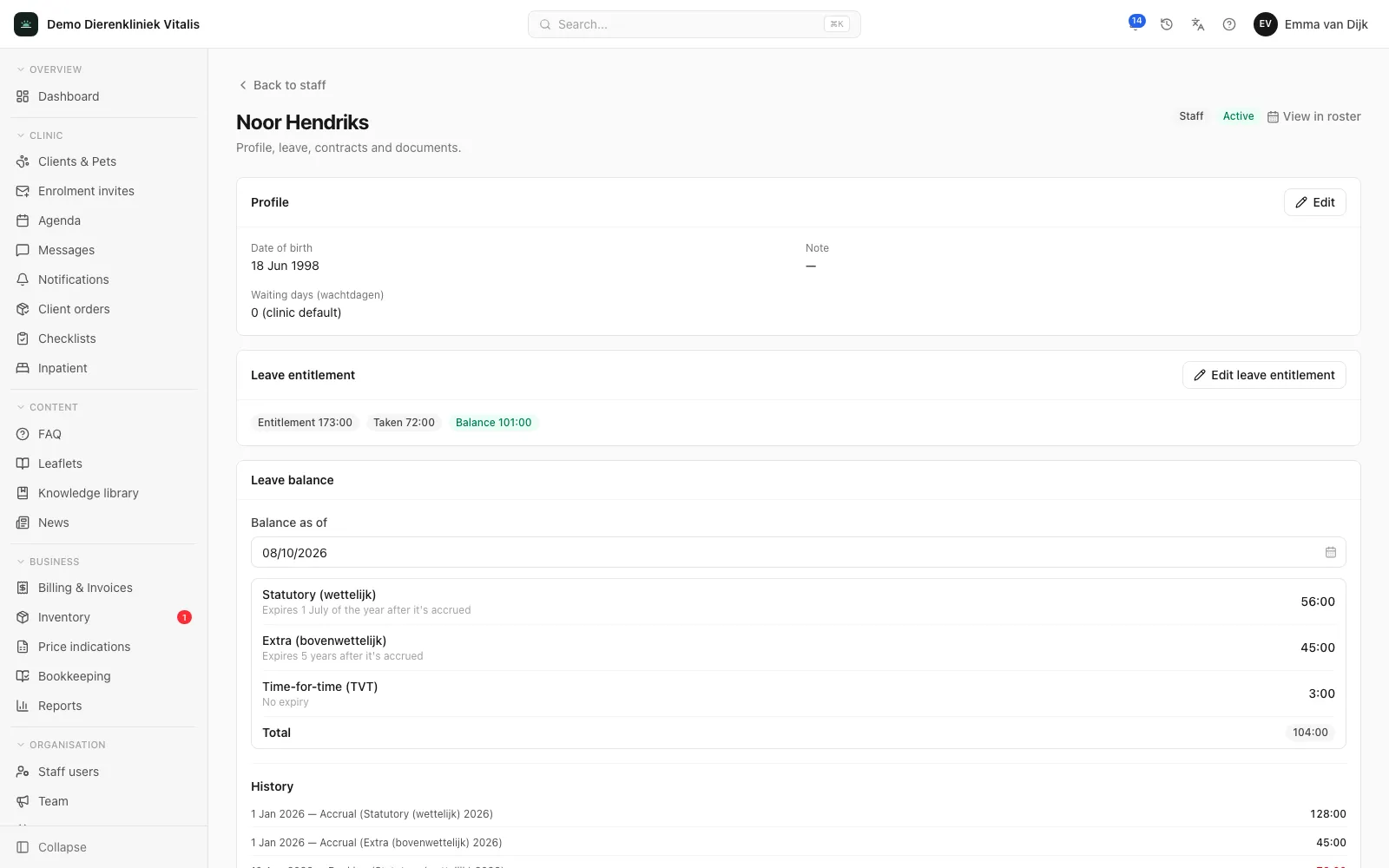
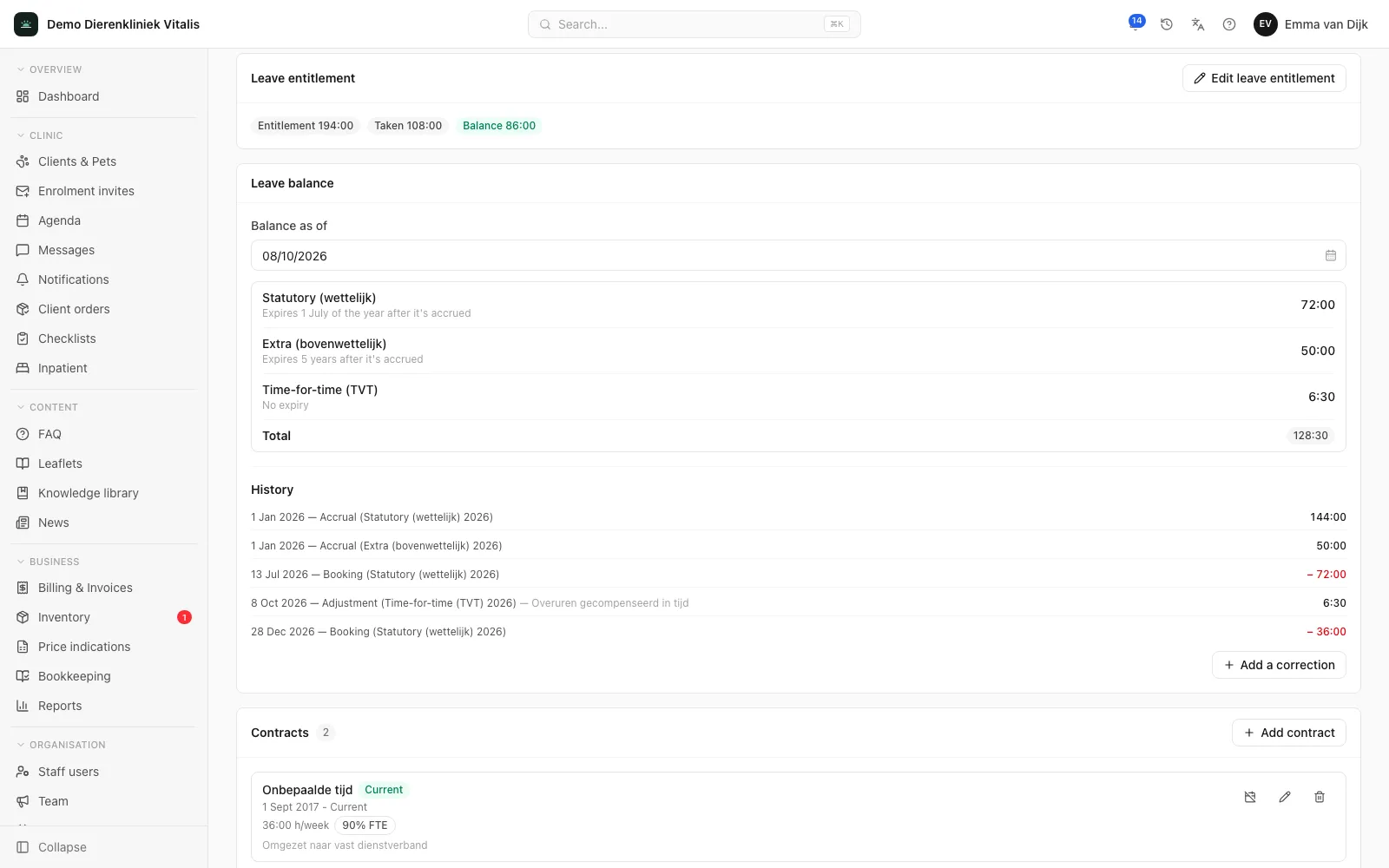
Leave balance per staff member with accrued and carried-over hours.

What it does for your practice

Request and approve leave

Staff request leave in the portal, for full days or part of a day. They see up front how many hours it costs and what their balance will be afterwards. You approve or reject from one approval inbox.

Balances under Dutch rules

Statutory leave, above-statutory leave and time off in lieu are kept separately. Statutory leave expires on 1 July of the following year, above-statutory leave after five years by default, and a request uses the leave that expires first. Every accrual, booking and correction is in the history.

Leave rules per contract type

Set how many holiday days a full-time contract gives and whether leave accrues yearly or monthly. Attach that policy to a contract type, and every staff member on that contract gets their entitlement calculated automatically from their contracted hours.

Sick reporting with Gatekeeper Act reminders

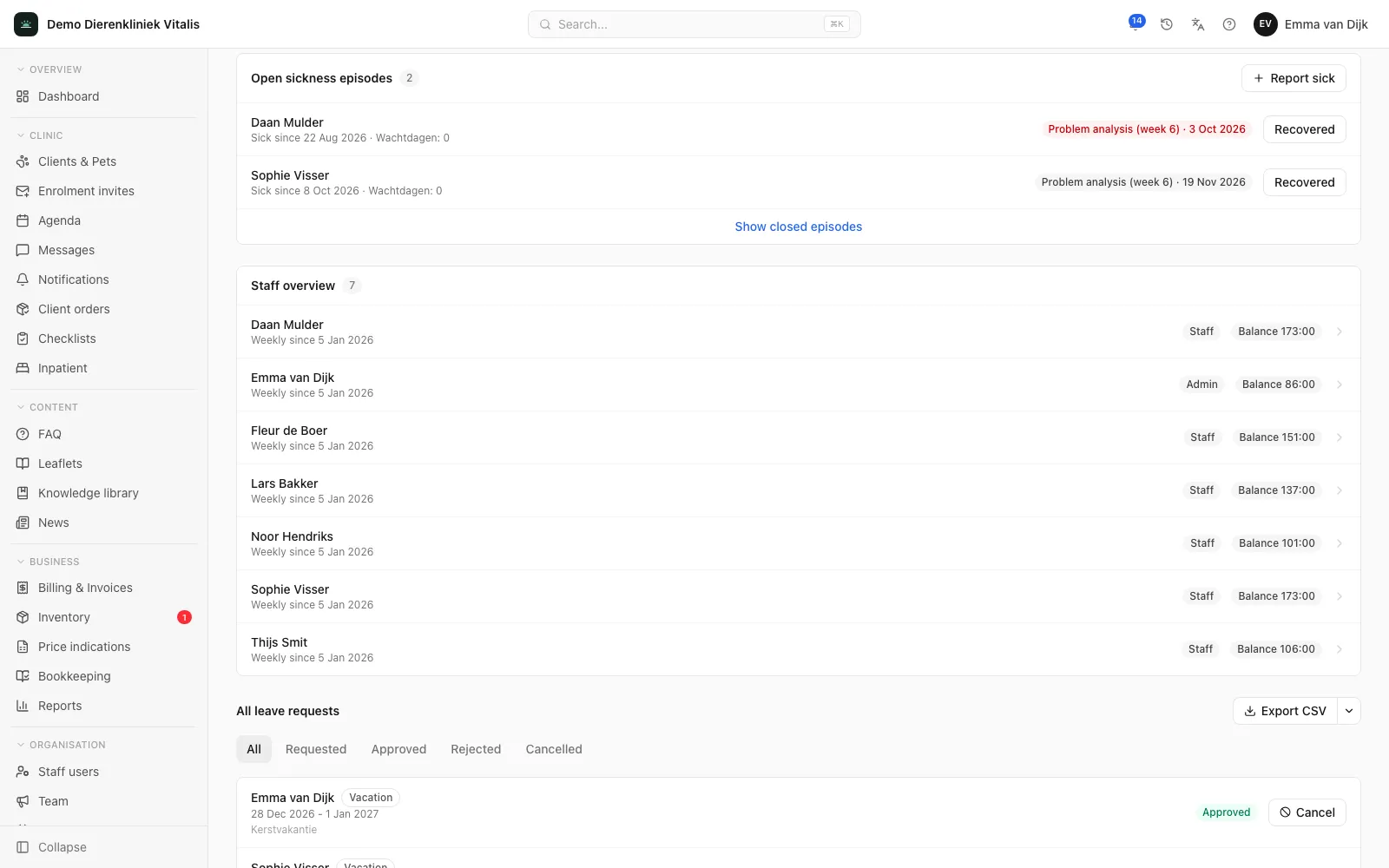
Report a staff member sick and recovered. The system reminds you a week ahead of each step under the Dutch Gatekeeper Act (Wet verbetering poortwachter), from the problem analysis in week 6 to the end of continued pay in week 104.

Hours and overtime

Staff confirm their hours worked per day or per week. Each month shows scheduled and actual hours, corrections and the running overtime balance. If you want, overtime goes into a time-off-in-lieu balance that can be taken as leave.

Contracts, documents and checklists

Per staff member, a contract history with hours per week and FTE percentage, documents such as contracts, certificates and ID copies, and checklists for onboarding and offboarding.

For the whole team

What each role gets

For every staff member

Request leave with a clear view of the cost in hours and the balance you have left afterwards, confirm your own hours and report yourself sick. All in the same portal you already work in.

For the practice manager

One inbox for leave requests, an absence calendar, open sickness cases with the next Gatekeeper Act step, and a page per staff member with contract, balance and documents. The dashboard shows who is out today.

For payroll

An overview per period with sick leave, time off, scheduled and actual hours and overtime per staff member, exportable as CSV, Excel or PDF. Waiting days are set for the clinic and, where needed, per staff member.

In practice

How it works

Plan leave without surprises

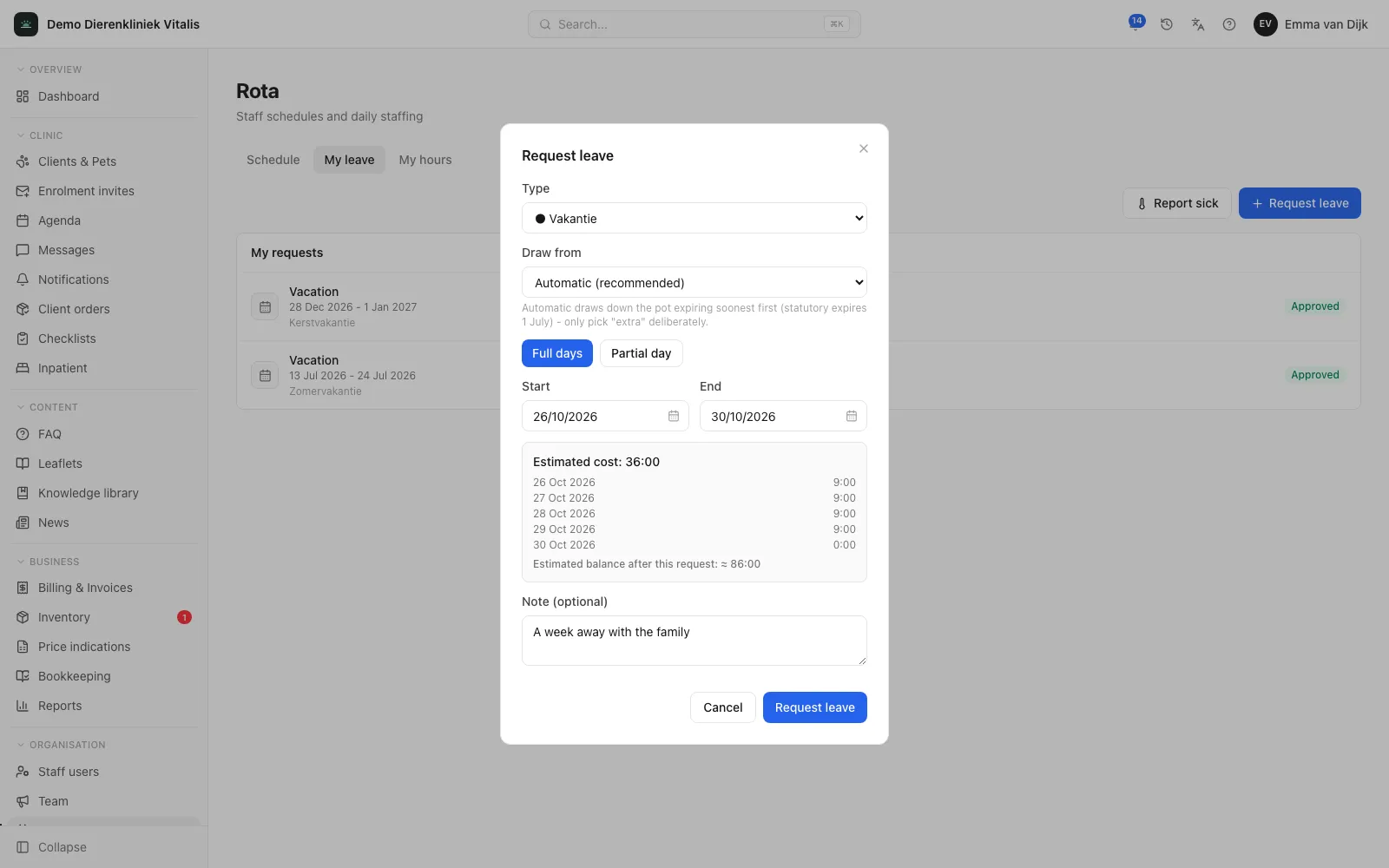
With every request you see the estimated cost in hours, the hours per day and your balance afterwards. Whoever approves the request also sees who is already off in the same period and how many colleagues are scheduled each day. You set up leave types yourself: which balance they use, whether they are paid, whether they need approval and which notice period or maximum length applies. Dutch public holidays are imported for a whole year in one step.
app.zoravet.com
A leave request with the estimated cost in hours, the hours per day and the estimated balance afterwards.

Hours worked and overtime

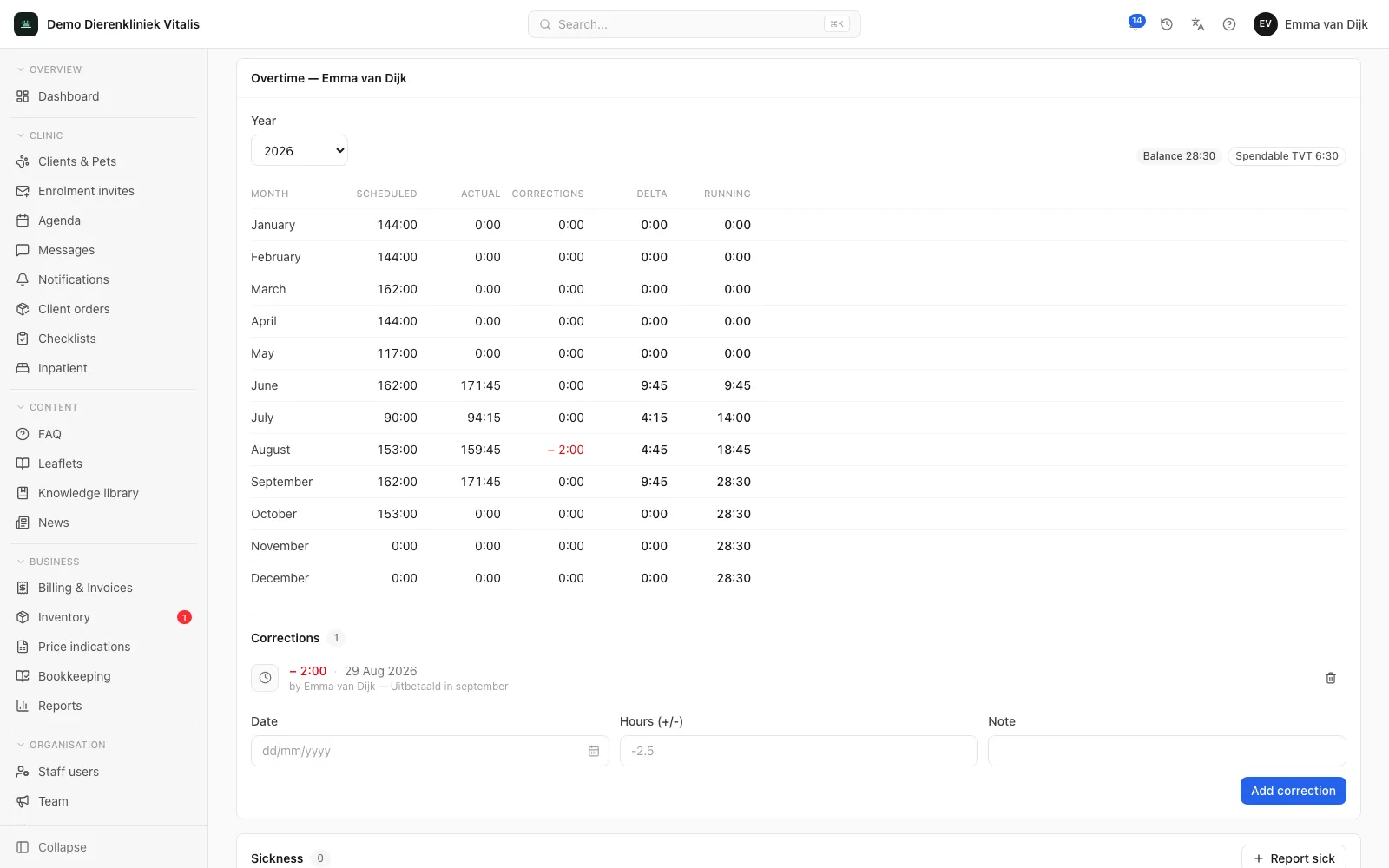
The overview per period shows sick leave, time off, scheduled and actual hours and overtime for each staff member. Per staff member you see the overtime balance by month, and you fix discrepancies with a plus or minus correction.

app.zoravet.com
A staff member’s overtime statement with scheduled and actual hours, corrections and the running balance per month.

Sick reporting and absence

A sickness case runs from the first to the last day of sickness. On recovery, the system records the sick leave automatically. You only record the period and an optional short note; that note is visible only to the staff member and HR.

app.zoravet.com
Open sickness cases with the first day of sickness and the next Gatekeeper Act step.

Everything per staff member

Every staff member has their own page with profile, leave entitlement and balance, contract history, documents and sickness cases. When someone leaves, you remove their access immediately. Once the contract has ended, you settle the remaining leave balance: holiday and time-off-in-lieu balances are netted, and only a positive balance is paid out. Employment records are kept for the statutory retention periods and deleted automatically afterwards.

app.zoravet.com
A staff member’s page with profile, leave balance, contracts and documents.

Frequently asked questions

Is HR an add-on module?

Yes. HR is an add-on module on top of the Clinic plan, at €20 per month, and like the plan price it scales with your number of invoiced patients. The rota itself is already part of Clinic; HR adds leave, sick reporting, contracts, documents and overtime. Enterprise includes HR.

Does the system track leave balances automatically?

Yes. Accrual, bookings, expiry and corrections are tracked per staff member, separately for statutory leave, above-statutory leave and time off in lieu. With a leave policy per contract type, the entitlement itself is calculated automatically too.

Does unused leave expire automatically?

Yes. Statutory leave expires on 1 July of the year after it was accrued, above-statutory leave after five years by default. A request automatically uses the leave that expires first. To change a balance you add a correction with a required note, never by editing the history.

Is any medical information stored?

No. For a sickness case you only record the period and an optional short note. Sick notes and other medical documents do not belong in Zoravet, not even among a staff member’s documents.

Ready to see your whole practice in one place?

Book a 60-minute demo. We’ll show you what the portal and your own app will look like and answer all your questions, with no obligation.

Book a demo