Practice software

Inpatient care and hospitalisation for your veterinary clinic Add-on module

Admit a patient from its appointment or its pet page and follow the whole stay on one shared inpatient board. Tasks, readings and protocols sit together per patient, and what you use during the stay goes onto the bill automatically.

app.zoravet.com
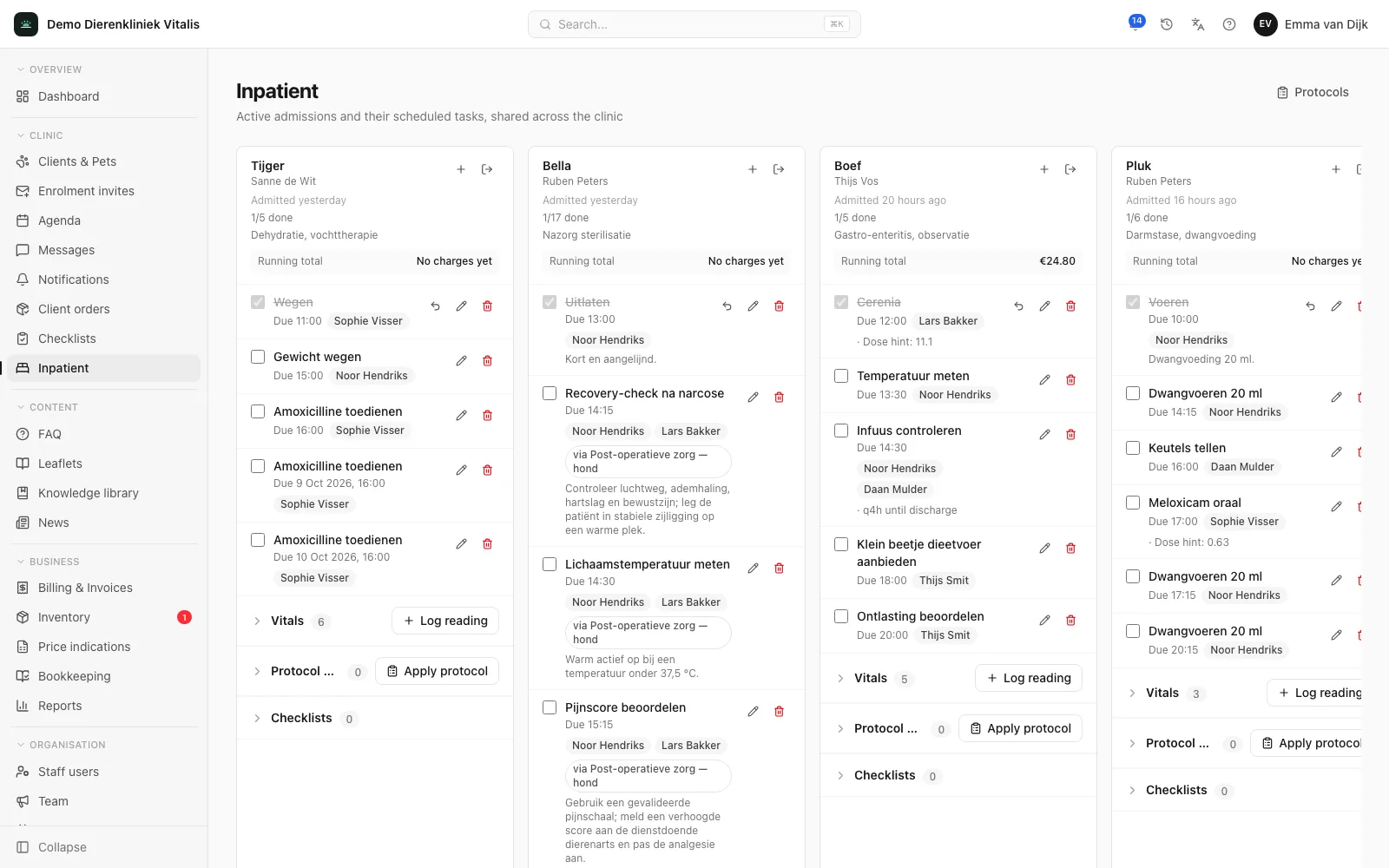
The inpatient board in the Zoravet clinic portal with admitted patients, their tasks and progress per patient.

What it does for your practice

One board for the whole clinic

Every admitted patient is on one board, showing its tasks, how many are done, how many are overdue and the running total. The board refreshes automatically, so everyone sees the same picture.

Tasks with a time, product and dose

Schedule medication, checks and care as tasks with a due time. Link a product and quantity, and have a dose per kg turned into a suggestion based on the most recent weight.

Repeat without retyping

Have a task come back every so many hours, a fixed number of times or until discharge. When repeating until discharge, the next task is created as soon as you check off the previous one.

Vitals as a timeline

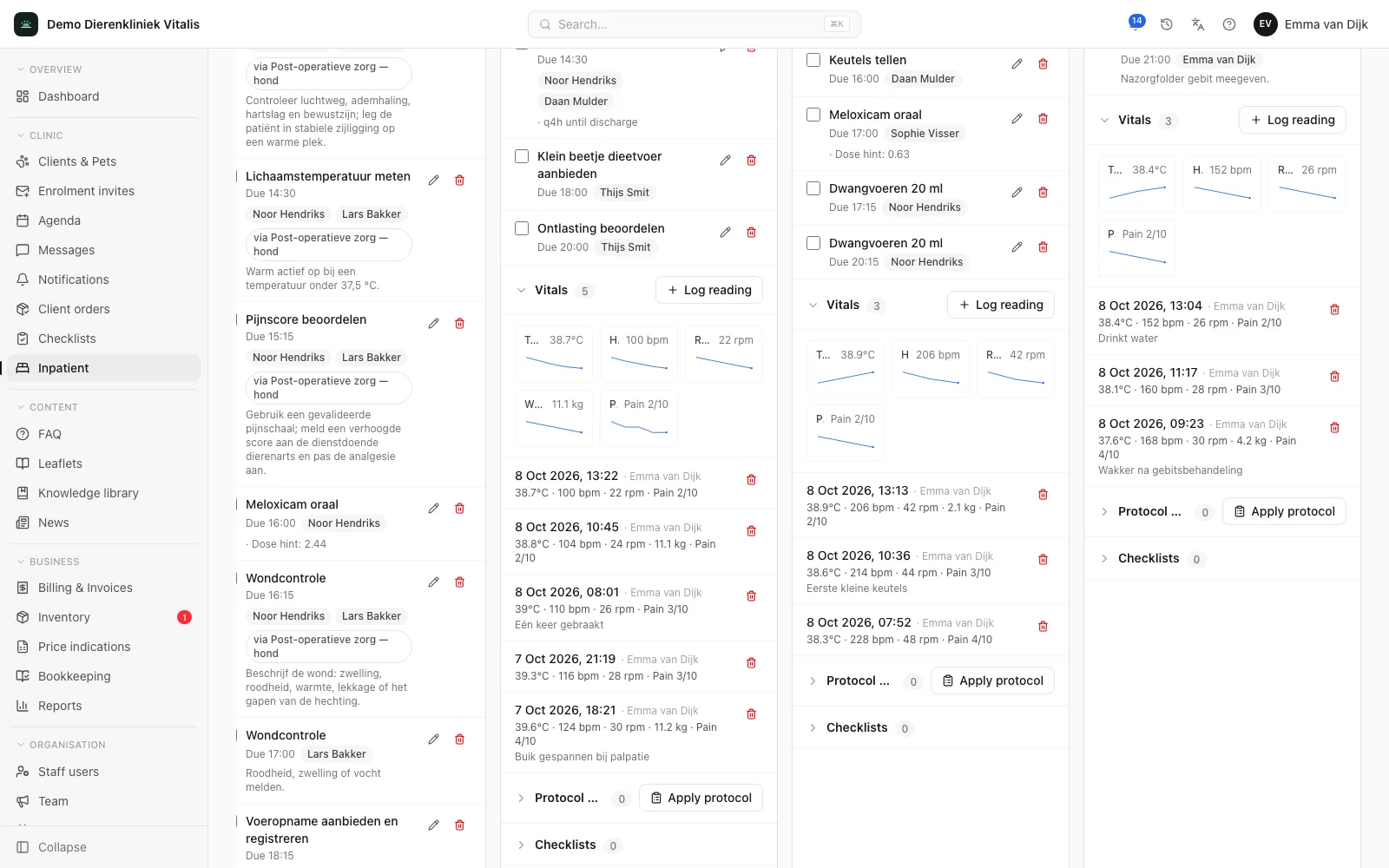
Record temperature, heart rate, respiratory rate, weight and pain score, and add your own fields. Each measurement shows its trend in a small chart.

Protocols for standard treatments

Set up a standard approach once as a protocol, with steps, due times, products and repeats. On a new admission you apply the protocol and every task is ready in one go.

Usage straight onto the bill

Check off a task with a product and that line goes onto the patient’s open consultation, or otherwise onto a counter sale for the owner. On discharge, the system warns you about tasks that are still open or not yet billed.

For the whole team

What each role gets

For the vet

Set up the treatment plan as individual tasks or as a protocol, with product, quantity and a dose suggestion based on weight. The vitals trend is right there with the patient.

For the veterinary nurse

The board shows which tasks are due and which are overdue. Checking one off is a single click; where a reading is needed, the system asks for it at check-off. A mistake can be undone straight away.

For front desk and practice manager

What was used during the stay is already on the bill. The running total is on the board, and on discharge you see at once whether anything is still open or unbilled.

In practice

How it works

Admit from the appointment

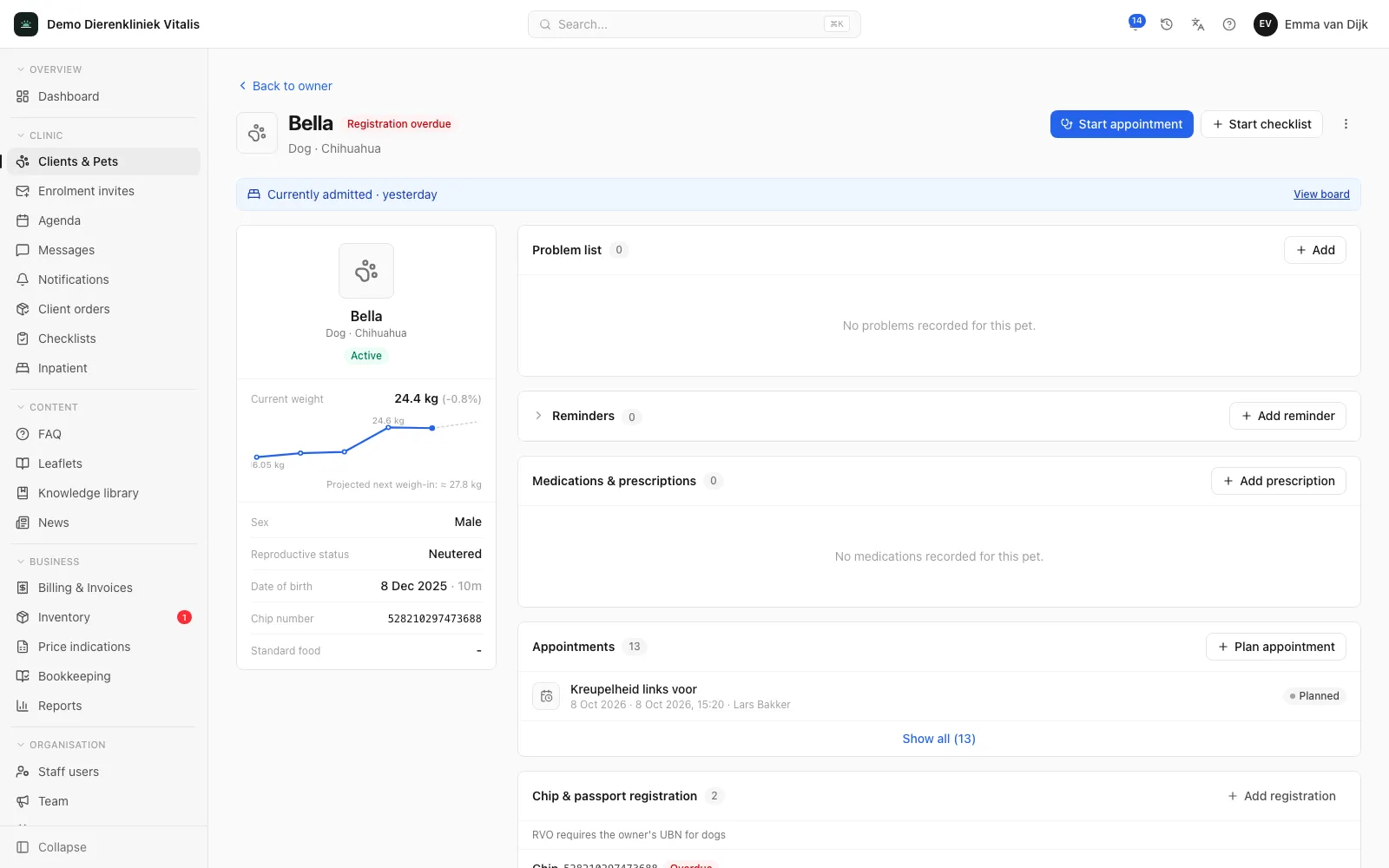
Start an admission from the appointment or the pet page, with a reason, notes and an expected discharge date. The consultation and the pet page show that the patient is admitted, with a link to the board. After discharge, the history stays with the patient.
app.zoravet.com
An admitted patient with the notice that it is admitted and a link to the inpatient board.

Assign and check off tasks

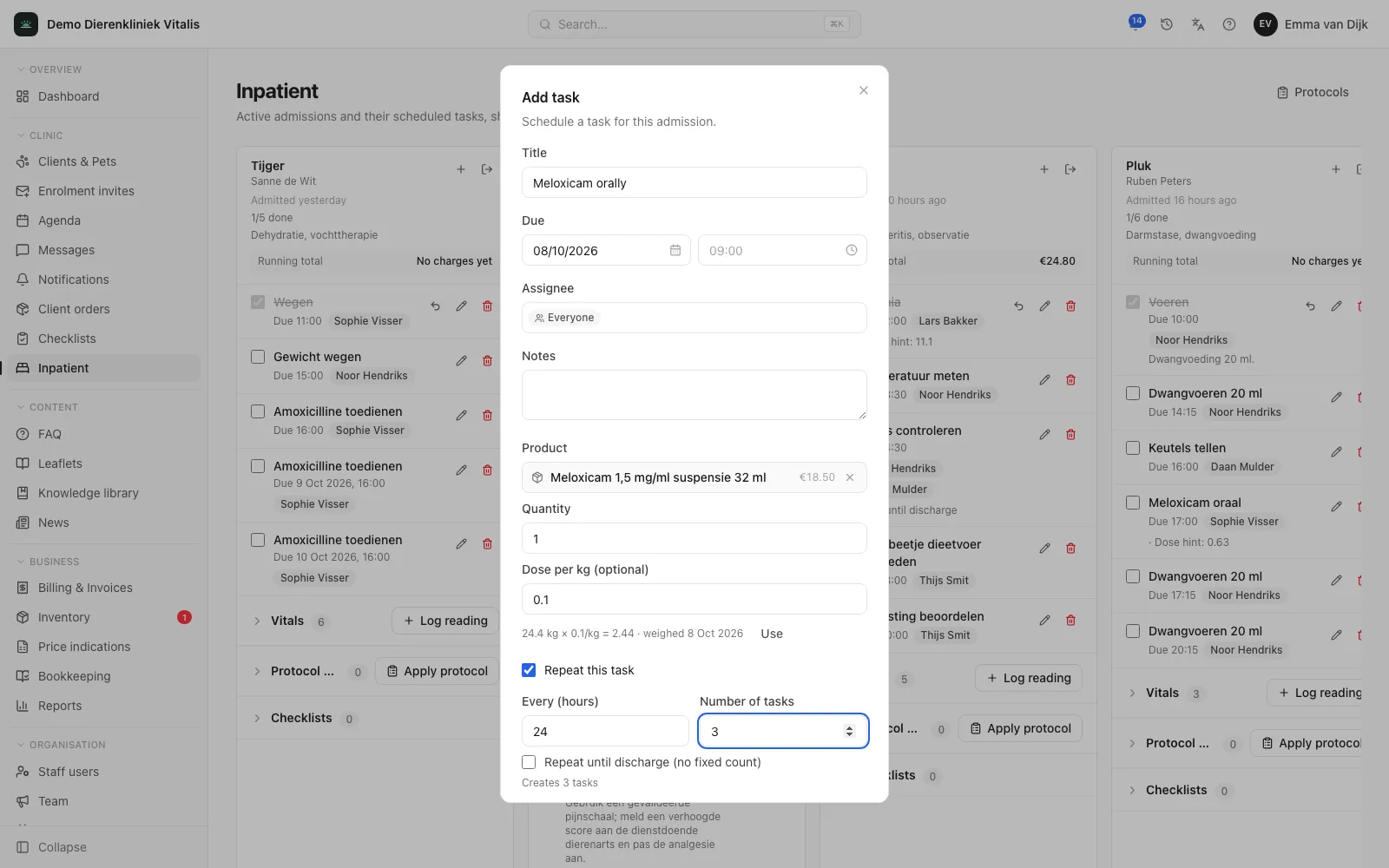
Assign a task to one or more colleagues, to a role or to everyone. A task can ask for a reading at check-off: a number, a short text or a vital sign. That value is recorded on the task, and a vital sign also goes into the patient’s timeline.

app.zoravet.com
The dialog for adding an inpatient task, with due time, assignee, product and repeat.

Vitals per admission

Temperature, heart rate, respiratory rate, weight and pain score (0 to 10) are ready out of the box. In settings you switch off fields you don’t use and add your own, as a number or as text.

app.zoravet.com
The inpatient board with the vitals for each admitted patient: a small chart per measurement and the readings below it as a timeline.

Protocols

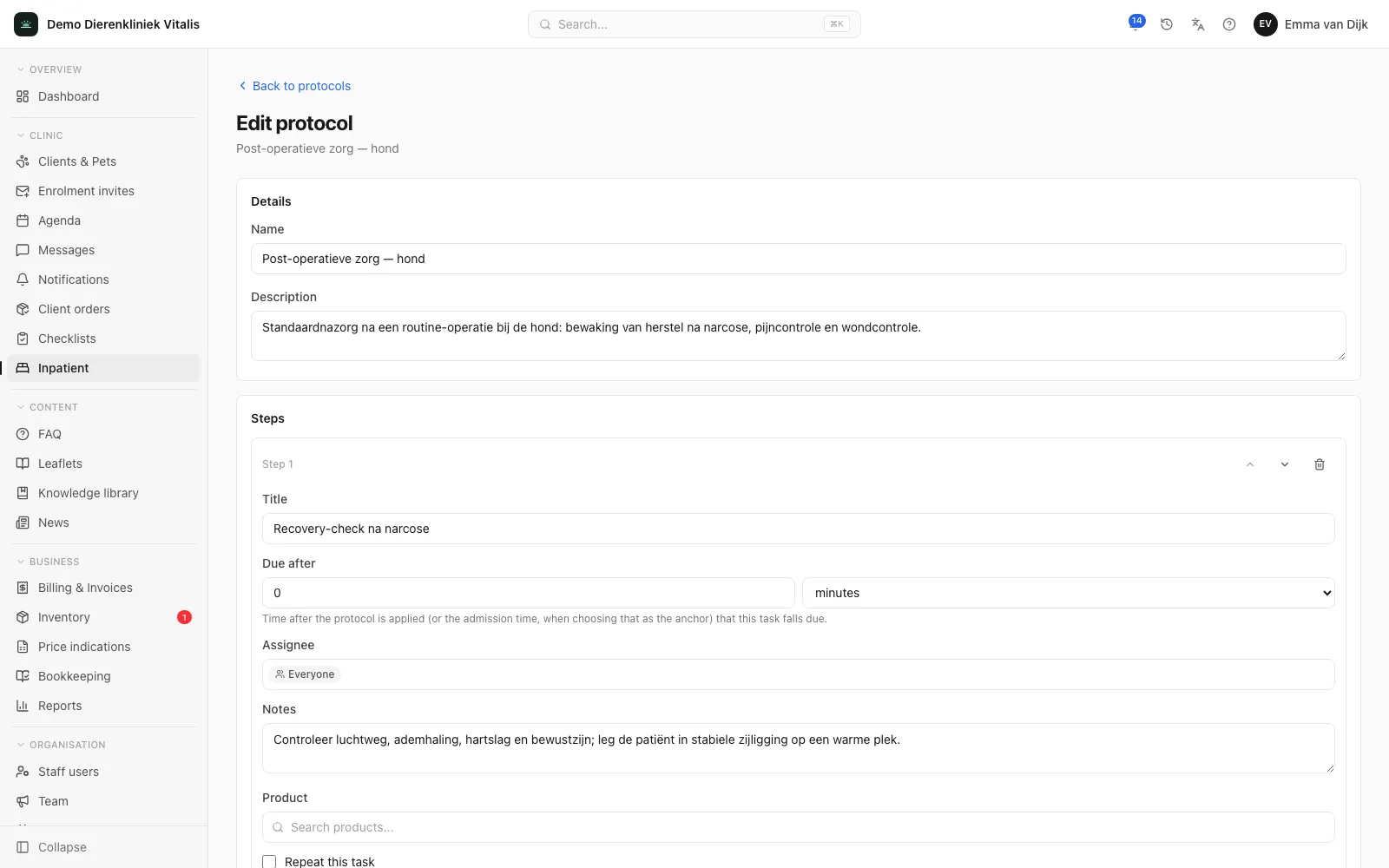
A protocol is a reusable task schedule: steps with a time after the start, an assigned colleague or role, a product with quantity and an optional repeat. You apply it from now or from the time of admission, and each admission shows which protocols were applied.

app.zoravet.com
A protocol in the clinic portal with steps, due times and products.

Frequently asked questions

Is inpatient an add-on module?

Yes. Inpatient is an add-on module on top of the Clinic plan, at €30 per month. Like the plan price, the module scales with your number of invoiced patients. Enterprise includes inpatient; Communication does not offer it.

How do inpatient costs end up on the invoice?

Checked-off tasks with a product go onto the patient’s open consultation, preferably the consultation from the same appointment. If there is no open consultation, they go onto a counter sale for the owner. That way you settle everything in one go.

Do the prescribing and dispensing rules apply during a stay?

Yes. Products on an inpatient task go through the same consultation or counter sale as anywhere else in the platform, so the same checks on prescription-only products and dispensing apply.

Who can see and use the inpatient board?

Everyone with access to inpatient sees the same board. Checking off, adding and editing tasks requires write permission, which you set per role.

Ready to see your whole practice in one place?

Book a 60-minute demo. We’ll show you what the portal and your own app will look like and answer all your questions, with no obligation.

Book a demo